
Setting up registration questions
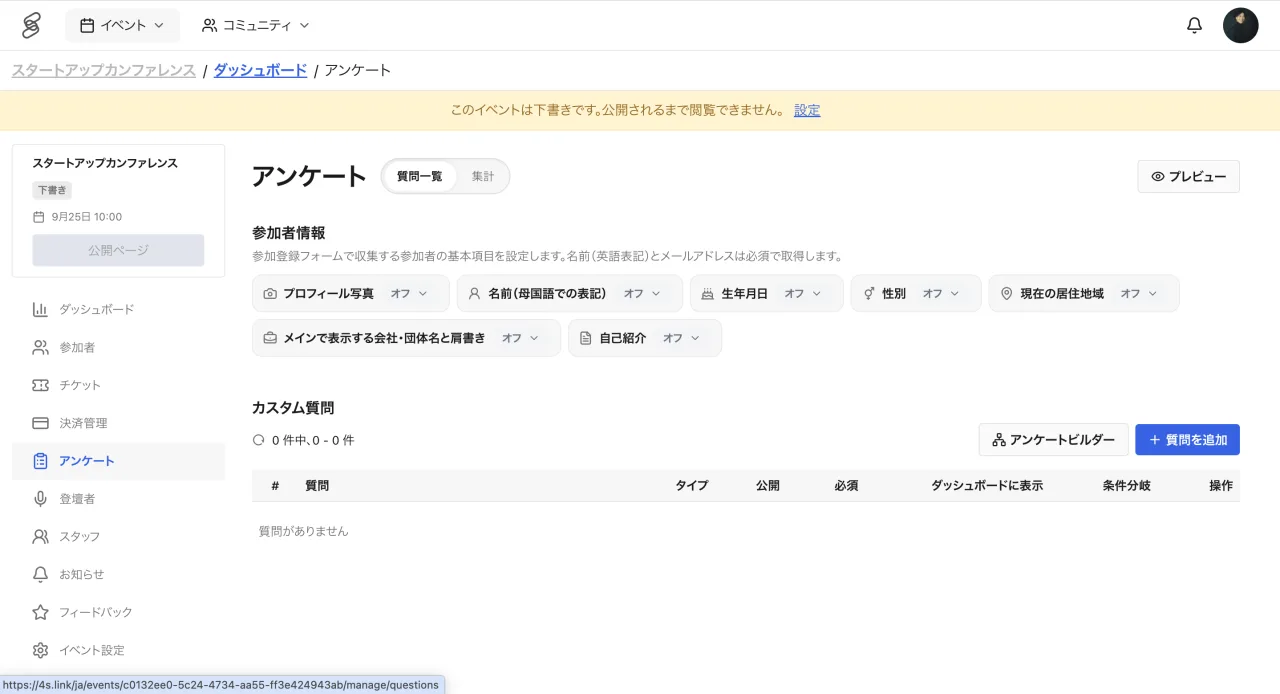
You can set up questions for participants to answer during registration. Collecting information such as affiliation or purpose in advance helps with approval decisions and day-of operations. Only staff with the ADMIN role can create and edit questions.
Question types
Choose from text (single-line or long), email address, URL, single select, multi select, radio buttons, toggle, date, and image. Each question can be marked as required or optional.
Conditional follow-up questions
Choice-based questions can have follow-up questions that appear only when a specific option is selected. For example, you can ask for a company name only from those who chose "Corporate". Only choice-based questions can have follow-ups, and branching is limited to one level.
Draft and published
Questions have "Draft" and "Published" states. Draft questions are never shown to participants, so review the content before publishing.
Reviewing answers
Answers can be reviewed on the attendee management screen and are included in the attendee CSV download. Viewing answers requires the EDITOR role or higher, and CSV downloads require EDITOR or ADMIN. Signed-in participants get their previous answers prefilled, keeping repeat registrations effortless.