
Sending announcements to attendees
You can send announcements to your event's attendees from the management screen. Use them for pre-event reminders, venue directions, and change notices.
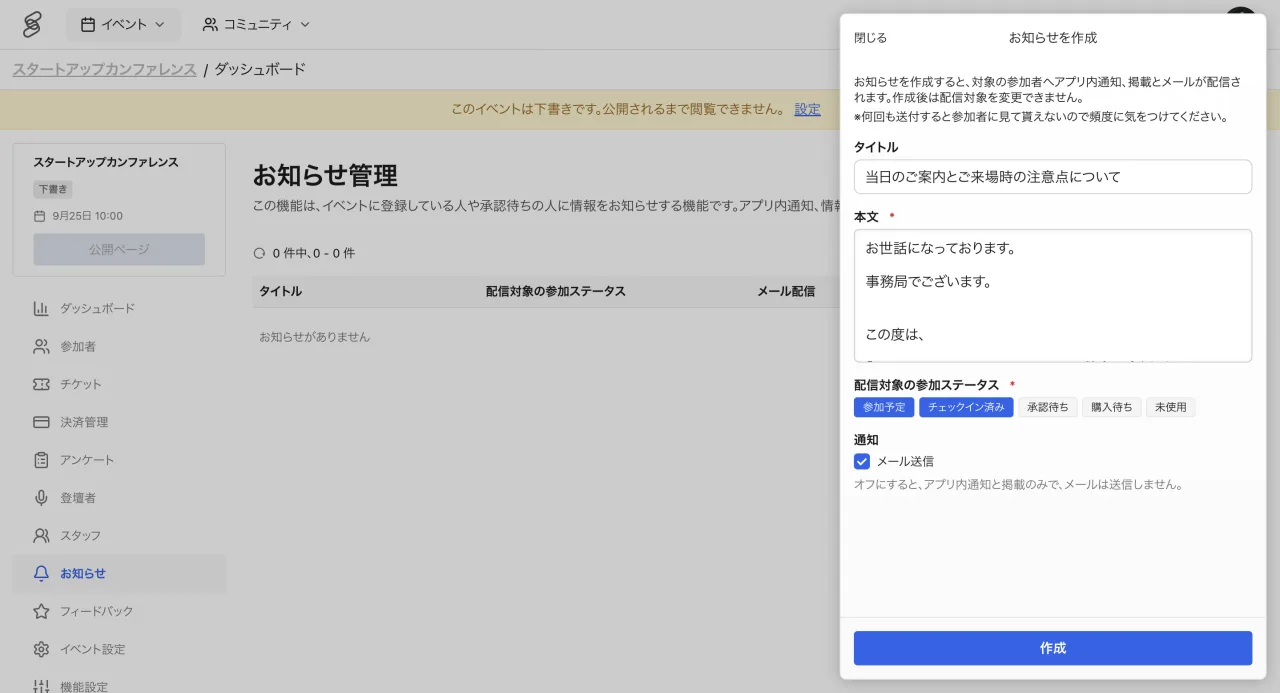
How delivery works
Announcements arrive as in-app notifications for attendees and are also posted on the event page. You can optionally send them by email as well.
Targeting recipients
You can narrow recipients by entry status or ticket type. For example, send a day-before guide only to confirmed attendees, or a meeting time only to buyers of a specific ticket.
Tips
- Before the event, splitting announcements into a day-before reminder and a morning-of venue guide keeps attendees oriented.
- For important changes such as date or venue, turn on email delivery in addition to the in-app notification.
Notes
- The recipients of an announcement cannot be changed after it is created. Double-check the audience and content before sending.
- Announcements can be created by staff with the EDITOR role or higher (COORDINATOR can view them only).